iPadOS 26 · Multi-window · Keychain
Code on iPad.
Deploy Anywhere.
Edit files, track Git changes, run commands and use your AI coding agent. A real dev environment, built for iPad.
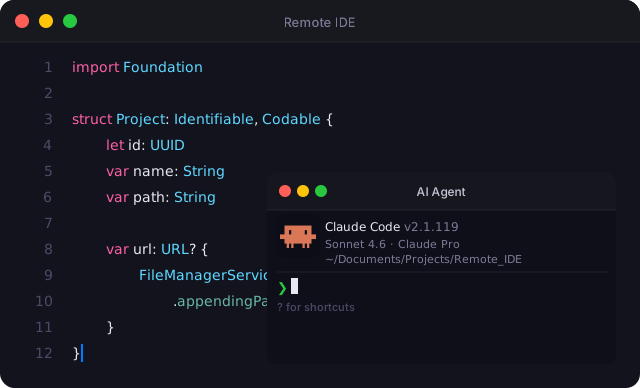
Edit files, track Git changes, run commands and use your AI coding agent. A real dev environment, built for iPad.
A complete toolset for developers who work from their iPad — without compromises.
Powered by Runestone and Tree-sitter. Supports Swift, Python, JavaScript, TypeScript, Go, Rust, and 15+ more languages with accurate highlighting.
Open a dedicated agent window alongside your editor and terminal. Run Claude Code or any AI tool in your SSH session without leaving the app.
Modified files are highlighted in the project tree. See what's changed at a glance, directly in the file manager — no extra tools needed.
Connect to any Linux server and run commands in a real VT100-compatible terminal. Full ANSI escape code support via SwiftTerm.
All projects live in your iCloud Drive. Open files in other apps, access them from your Mac, and never lose your work.
Push your entire project to a remote server or pull it back with a single tap. SFTP-powered, fully recursive, blazing fast.
Authenticate with a password or private key. Manage multiple servers. All credentials stored securely in the system Keychain.
A custom row above the keyboard with Tab, brackets, dot, equals, and hash — the keys you actually need when coding on iPad.
Create, rename, delete, and share files and directories. Navigate your project tree with the familiar iOS sidebar.
Build a library of frequently used commands. Run any saved command in your active SSH session with one tap.
Automatically follows your system appearance. No manual toggle needed — just open and code.
Run Remote IDE alongside a browser or documentation in Split View, or manage multiple IDE windows in Stage Manager — full iPadOS 26 multi-window support.
Remote IDE does not collect any data. There are no analytics, no telemetry, and no accounts. Everything stays on your device or in your own iCloud.
Your SSH passwords and private keys are stored exclusively in the iOS Keychain — the same secure hardware-backed enclave used by the system itself. They are never written to files, logged, or transmitted to any third party.
Have a question or found a bug? Reach out by email — we respond to every message.
remote_ide@icloud.com